Frequently Asked Questions
Find quick answers about custom quotes, printing methods, file setup, proofs, security, and using the Rocket Color website.
Still Have Questions?
Print projects can vary. If you are unsure about files, paper, turnaround, quote details, or what product to choose, our team is here to help. You can also use the AI Assistant by clicking the red chat bubble in the bottom-right corner of any page for quick answers and guidance.
Custom Quote Questions
How long does it take to receive a custom quote?
This depends on the complexity of your quote request. The vast majority of our estimates are completed within 24 hours.
How long are your estimates valid for?
Estimates expire after 30 days. The estimate will be available on our website during that period and will be removed after it expires. After that, we will need to redo the estimate.
How do I proceed after I receive an estimate from you?
Once your estimate is complete, you will receive a link to the web page with your estimate. After reviewing the estimate, add it to your shopping cart, upload your files, and proceed to checkout.
How do I check the status of my quote request?
Please select “Quotes” from the “My Account” menu to check the status of your quote request.
Can’t I just email you all the information instead of using a custom quote form?
Yes, you can. However, we can usually respond faster if you fill out the custom quote form. The form contains the information we need to complete the estimate. If you send an email, there is a chance a required detail may be missing.
Printing Questions
What is offset printing?
Offset printing is a technique where the inked image is transferred, or “offset,” from a plate to a rubber blanket, and then to the printing surface. When combined with the lithographic process, the offset technique uses a flat image carrier where the image area accepts ink while the non-printing area attracts water and remains ink-free.
What are the advantages of offset printing?
- Consistent, high-quality images.
- Sharper and cleaner images and type than many digital methods.
- Works on a wide range of printing surfaces.
- More cost-effective for higher-volume printing.
- Can accurately reproduce Pantone Matching System colors.
What is digital printing?
Digital printing is a method of printing where data and images are printed directly from a computer file onto paper or another printable material.
What are the advantages of digital printing?
- Lower cost for many low-volume print runs.
- Faster turnaround time.
- Supports variable data printing.
- Produces less setup waste than offset printing.
- Often allows more accurate proofing for short-run jobs.
How big is the quality difference between offset and digital printing?
The quality difference can range from almost negligible to significant. Most photographs and text reproduce well on high-end digital presses. However, jobs with large solid areas of color may look better with offset printing. Although we print on high-quality digital equipment, we cannot guarantee offset-quality printing on every short-run job.
What type of paper should I choose for offset printing?
Offset presses print well on many types of paper. The best paper choice depends on the product, quantity, finish, and desired final look.
What type of paper should I choose for digital printing?
The best paper choice depends on the product and desired finish. If you are unsure, our team can help recommend an option that works well for your project.
What is better for the environment: digital or offset printing?
Digital printing can be more eco-friendly for some short-run projects because it typically produces less setup waste than offset printing and uses dry ink or toner.
I’m still not sure which printing method I should choose.
We may recommend offset printing if:
- Quality is your main concern.
- You require high-volume printing.
- You want to print on thicker paper stocks.
- The finished size is larger than a typical digital press sheet size.
We may recommend digital printing if:
- You need a shorter turnaround time.
- You require a lower-volume print run.
- You need variable data printing.
Will you send me a proof before printing starts?
Yes, if you order one. We can provide a soft proof or a hard proof for color-critical jobs. A soft proof is typically sent by email. For color-critical orders, we recommend requesting a hard proof.
Can I print with PMS/Pantone colors or other special inks?
Yes, depending on the project and production method. For many jobs, process color may be recommended, but Pantone or specialty ink needs can be reviewed as part of a custom quote.
File Questions
What file formats do you require? How do I set up my files correctly?
We need a 1-up, press-ready PDF file with crop marks and bleed. Proper file setup helps avoid delays and production issues.
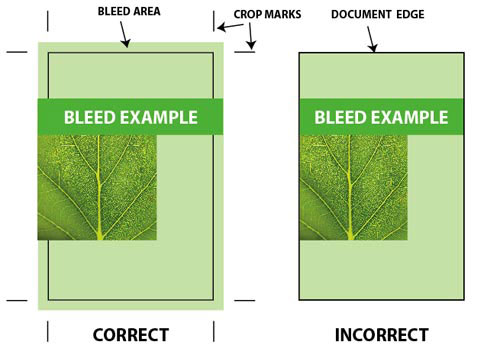
What are crop marks?
Crop marks are printed or drawn lines that indicate where the paper should be cut to produce the correct final size.
Do I have to draw crop marks manually?
No. Most desktop publishing software can create crop marks automatically when you export your file as a PDF. Make sure the trim size matches your document size. For example, if the finished business card size is 3.5" x 2", your document size should match that size.
Do I have to impose my artwork myself?
No. Files are typically imposed through our workflow. If you submit an imposed file yourself, we may need to break it apart and re-impose it.
What is bleed?
If any element in your layout touches the edge of the document, you should include bleed. Bleed means extending the design beyond the trim edge so there is no unwanted white edge after cutting.
The term “bleed” refers to objects that extend beyond the border of your document.
Should I convert my files into CMYK?
No. Conversion from RGB to CMYK is handled automatically in our workflow.
What resolution should I use for the images in my artwork?
We recommend that images be saved at 300 dpi whenever possible.
Security & Privacy Questions
Do you keep credit card information on file?
No. For your security, we do not keep credit card information on file.
Is your website secure?
Yes. Our secure checkout system uses secure server technology. Your order is submitted and retrieved through a secure connection.
Will you share my information?
No. We keep customer information internal. Occasionally, you may receive offers and announcements from Rocket Color by email, and you may unsubscribe from those messages at any time.
Website Questions
What browsers work best with your site?
Our site should work with most modern browsers. For the best experience, we recommend using a current version of Google Chrome, Microsoft Edge, Safari, or Firefox.